



Joomla! is a free, open source content management system (CMS) developed by contributors worldwide, designed to be straightforward for beginners while remaining flexible and powerful enough for more experienced developers.
Of course, this CMS, which has existed since 2005, has its limitations and the inherent complexity one might expect from a community-driven project on a global scale. Yet while acknowledging that no software is perfect, Joomla makes it possible to build a truly multilingual website in a simple, stable, SEO optimized, and secure way, offering a powerful permission system built on proven technologies that are regularly updated — all without installing a multitude of extensions, at a reasonable cost, and while retaining full control over your data.
The latest updates of Joomla have delivered the long-awaited modernisation of the framework, particularly in terms of its asset management, the CMS interface, and security. Joomla 5.4 introduced automatic core updates in October 2025, inspired by WordPress, and Joomla 6 brought numerous additional improvements such as a GDPR-compliant captcha. The open source codebase on Github follows the most modern and demanding development principles. Joomla is now recognised by the United Nations as a Digital Public Good (DPGA) and has received support from the European fund Sovereign Tech to make the CMS compliant with the most advanced accessibility requirements.
Furthermore, it is software that is not tied to any company's interests, but is legally governed by a non-profit association (Open Source Matters). This non-profit legal structure promotes long-term user interests rather than the pursuit of immediate profits by the software's creators. This is an important criterion when looking for a durable technical solution, whether for SMEs, government organisations, or associations. Downloading the software requires no registration with a commercial service, you will not receive unsolicited marketing emails, and the absence of premium upsell advertising — which is increasingly creeping into the backends of modern CMS platforms — is particularly refreshing.
Finally, you are free to choose and change your hosting provider, which is significant in the context of increasingly strict data protection laws or other decisions related to the legal evolution of the host countries of online website builders. See, for example, Shopify's recent decision to remove the sale of electronic cigarettes from its platform.
Programming without touching the application core
Joomla is a complex open source application that is regularly improved. It is therefore important not to alter its core, so that updates can be applied smoothly whenever a new version is released. The good news is that there are many ways to override or extend the existing source code, make use of the CMS's numerous custom fields, or create your own extensions.
Joomla's components (applications routing their own URLs, such as the content manager) and modules (display widgets) conform to the MVC programming model (separation of logic and presentation). Users can substitute the HTML/PHP code of any view by placing it in a folder named HTML within their template directory, inject or remove JavaScript or CSS, and even create alternative views. The administration interface allows these overrides to be generated quickly with a single click in the template manager. Other interface elements, called Layouts, can be substituted in the same way. These files can be customised and will not be overwritten during the next update. Joomla 5 greatly improves their management by offering a change notification module and a built-in CodeMirror editor with a diff function (change detection).
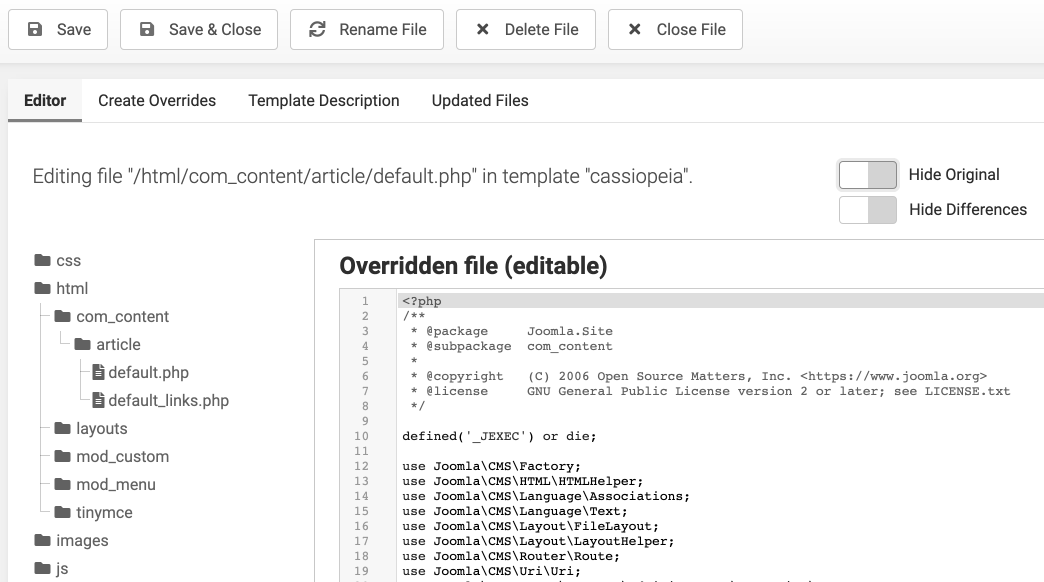
When these techniques are not sufficient, it is possible to develop a third type of extension — a plugin — which modifies the overall behaviour of the application. For example, a plugin can add a new type of custom field, run recurring tasks, encrypt email addresses, or transform shortcodes into more complex interface elements such as slideshows. The fact that Joomla allows different types of extensions to be created — rather than simply adding plugins that load on every execution — is a major advantage of this CMS.
Adapting the site's appearance by page and category
By default, Joomla publishes an HTML code that is readable by all search engine and AI indexing bots. CSS can be injected at different levels to modify the site's appearance: within the template, directly in articles, or within extensions — particularly modules. Modules can be enabled or disabled for each page or category assigned to a menu item. This is convenient, as modules can load their own stylesheets or JavaScript files, enabling very fine-grained control over what is loaded and when.
Joomla's menu manager also allows class names to be added to create CSS rules specific to a particular page, or to select a template style. In the default Cassiopeia template, an XML file is used to configure template styles — just like all other Joomla extension types. For example, it is possible to create a logo selector, a colour code picker, or a simple text field without having to code the interface from scratch. This is a real advantage over other CMS platforms. Joomla uses Bootstrap 5, which allows the responsive Cassiopeia interface to be tailored precisely by creating child templates.
Installing extensions
The JED (Joomla Extensions Directory) offers thousands of free and paid extensions that can be downloaded and installed directly from the CMS administration interface. All extensions are mandatorily licensed under the GPL, meaning you are free to modify the code for your own use. However, the quality of their source code and their compatibility with the most recent versions of Joomla and PHP can vary. That said, certain developers such as Akeeba, JCE, RSJoomla, or Simplifyyourweb are worth recommending based on personal experience. Templates — which are special extensions used to customise the site's appearance (equivalent to WordPress themes) — are listed on this site. Among the best-known and most comprehensive professional template frameworks, it is worth mentioning Yootheme Pro, Gantry 5, Helix, Astroid, and PageBuilder CK. Others highlight integration with AI such as Template Architect or Aura Builder..
Building your own extensions
Admittedly, the object-oriented programming interface is complex and requires navigating Joomla's class hierarchy, which is regularly updated. The documentation is steadily improving thanks to regular contributions from volunteers. To save time, it is possible to generate the skeleton of the extension you wish to develop in several ways:
- with Component Creator and its AI features,
- via vibe coding if you know what you're doing,
- or by downloading a component, plugin, module, or template boilerplate from Github.
Indeed, building the multilingual MVC structure of an extension and configuring it with XML and INI files is the most tedious part. It is better to automate what can be automated. Examining the source code of an extension installed by default by the CMS can be a good starting point.
The ingenious UP (Universal Plugin) system, developed by a French-speaking developer, makes it easy to customise Joomla articles and modules using a selection of 150 actions configured via shortcodes. The advantage is the ability to duplicate and customise these actions at the PHP, JavaScript, or CSS level without having to create, maintain, and multiply Joomla extensions.
Joomla is also well known for its CCK (Content Construction Kit) type development extensions such as Seblod, Fabrik, Flexicontent or Custom Tables, which are useful for building more complex applications in specific domains.
The command line
Command-line access to the CMS, inspired by Symfony, is not yet as advanced as wp-cli or Artisan, but it is straightforward to create your own PHP scripts with the advantage of natively using the dd and dump debugging functions. Type php cli/joomla.php list to get the list of available commands in your version of Joomla (cache clearing, session cleanup, updates, password changes). The clear database structure makes it possible to do a great deal fairly simply. In addition, Joomla includes an API that enables more complex tasks such as article imports or updates. Finally, cloning a simple site to a local environment takes 10 seconds with a Shell script of just a few lines — if you prefer not to use the ubiquitous Akeeba Backup.
Security
The security of a CMS on a server is a topic in its own right, given the risks associated with a lack of knowledge among beginner webmasters. That said, by following the advice above, it becomes clear that keeping the application and its extensions up to date will already considerably improve the security of your site.
Joomla is considered "out of the box" one of the most secure CMS platforms, according to the founder of Akeeba. It also ships with numerous essential security features: the administration interface is protected by multi-factor authentication and passwordless login, SSL is built in, the CMS gets monthly automatic core updates, and the HTTP Headers plugin adds security rules to HTTP headers as its name suggests. When developing your own extensions, there is no need to reinvent the backend logic. The JForm class makes it easy to define, via an XML file, the fields to use when creating the backend of a module, template, component, or plugin — all while benefiting from Joomla API's built-in security rules and filters. A dedicated team is ready to address security issues at any time — something no custom-built CMS can offer. Numerous additional security rules can be included in the Apache server's htaccess file to block attacks. If in doubt about securing your site, or if you manage a large number of sites, it is worth installing an extension such as Akeeba Admin Tools (paid version), which will generate the appropriate rules for Apache/Nginx on your behalf and offer additional protection, auditing, and alerting services.
Source: Developer documentation, Github