



Note‑taking is an essential skill for acquiring new knowledge. Today, computers and tablets have replaced paper and pencil. Recording notes from meetings, classes or reading sessions, improving them and structuring them with specialised software is both enjoyable and extremely useful. But you still need to choose the right tool.
For a web development professional as well as for a student, personal note‑taking offers many advantages:
- Memorising and better understanding new concepts by writing them down and structuring them in your own way.
- Creating a personalised reference document based on your needs, because it is unrealistic to master 100% of every piece of software or technique we use. An expert in iOS application development will be less proficient with the Android system or the PHP programming language.
- Professionalising your approach by learning from your mistakes and creating your own checklists, for example to optimise a website or strengthen its security against hackers. This way of working is reassuring and reduces stress, because note‑taking ensures that solutions to past problems can be reused in the future. Who wants to frantically search for an urgent bug fix twice in a row?
- Drafting the structure of an article or the outline of a training session to share knowledge with colleagues, clients, students or a blog audience.
There are many free or paid applications for taking notes; here are a few:
- Mind‑mapping applications such as FreeMind, Inspiration or iThought;
- Text organisers (or outliners) such as OmniOutliner;
- Personal assistants such as Evernote, its open‑source version NixNote, Microsoft OneNote (free), or DEVONthink Pro.
How does an outliner like OmniOutliner work?
OmniOutliner, available on Mac and iOS (iPhone, iPad), allows you to structure information hierarchically and easily move items around to reorganise them. The English word outliner, nicely translated as idéateur in French, describes its main strength well: creating and structuring new notes quickly and without constraints.
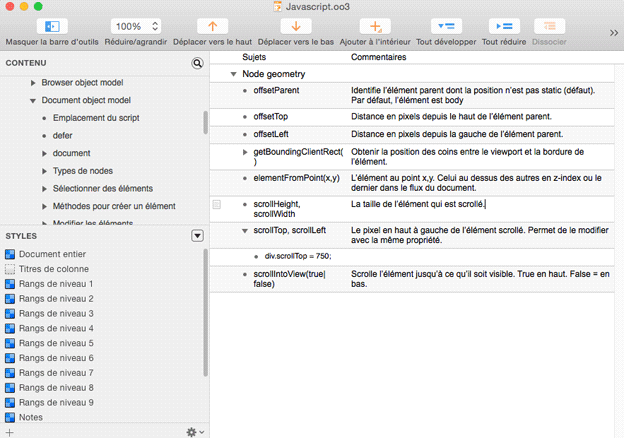
When you add information in OmniOutliner, you create a new row that can be moved by drag‑and‑drop before or after another row, but also inside a parent row. Rows can be expanded or collapsed to show or hide child rows by clicking the small black arrow. A command allows you to collapse all rows at once, which helps clear your view after several hours of intensive use! The search tool allows you to look inside a specific row or throughout the entire document. The Copy as Link function lets you create hyperlinks inside very long documents.
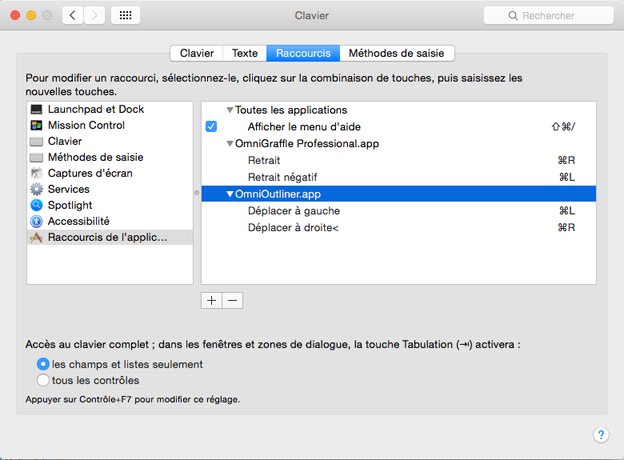
It is recommended to create your own keyboard shortcuts for important commands. For example, I use CMD‑R to move an item to the right, meaning inside the row that precedes it. On Mac, go toSystem Preferences > Keyboard > Shortcuts > App Shortcuts
and click the + button to create a new shortcut. The menu label must be copied exactly.
A major advantage of OmniOutliner is the ability to have a second column—or several—like in a spreadsheet. This additional column is useful for adding explanations, URLs or code snippets that are immediately accessible without constantly opening or closing rows. By keeping good readability in the first column, it becomes easier for the eye to scan information quickly.
Formatting by row and column
The style palette is classic, but it also allows you to modify the appearance of the document for each column or row level separately (for example all level‑2 rows), which is very useful for formatting the document after generating a large number of new notes in the heat of the moment. Once customised, documents can be saved in a template folder for later reuse. If you need to create a presentation, your notes can be exported to common formats such as Microsoft Word, PowerPoint or Apple Keynote.
OmniOutliner can also import spreadsheet data in .tsv format and export it to Microsoft Excel (.xlsx). It is fantastic for keyword mapping because it allows you to easily reorder lines.
In short, as you will have understood, the strength of this note‑taking application is that it stays in the background to encourage the user’s creativity, which should be the goal of any good software interface.